Flat & Responsive Design, Optimized for an amazing User Experience

Overview
- WordPress 3.7+ Ready
- Pixel-perfect frontend work based on Bootstrap3+
- Customization tool included
- WPML Ready (.po files included)
- Translation tool included
- SEO Optimized
- Supports Chrome, Safari, Firefox, Opera, IE8+
- Easy Updates right in the WordPress backend
- Layered PSD files included
- Direct one-on-one email support
- Ability to port into existing blogs
What you get
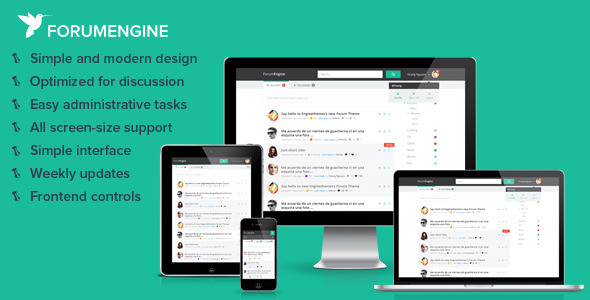
Simple, Modern design – Even without paying a designer to keep your site looks up-to-date, your community discussion board can achieve that timeless appearance all the time.
Optimized for discussion – You are building a freedom wall where freedom is 100%. With more interactive features for users, your site gets that hook that makes them come and come back.
Easy administrative tasks – You won’t spend much time managing your content. Get it done right in the frontend and only visit the backend occasionally to modify some initial settings.
All screen-size support – A hybrid approach with responsive design for bigger screen sizes from tablets to desktop computers, and a dedicated mobile design for small screen sizes as smartphones.
Simple interface – We’ve cut the gimmicks and delivered a set of simple, intuitive features that serves its purpose, without clutter, chaos, or useless elements. Simplicity is the core of our design philosophy.
Weekly updates – Our themes are living projects – they’re never “finished”. We constantly tweak and improve features, rolling out minor updates to our customers every single week.
Frontend controls – Custom frontend controls let you publish and edit content without leaving your homepage. Spend less time struggling and more time creating.
Support or pre-sale questions
Feel free to send us emails to get your concerns answered.
For support, we have included the documentation file for your reference. You can also:
More ForumEngine features
- (new) Blogging feature, ability to use ForumEngine on existing blogs
- (new) Quick search preview, easy to get what you’re looking for
- (new) Login by Facebook and Twitter accounts
- (new) Lock editing 5 minutes after posting the replies
- Retina ready design, beautifully optimized for large screens
- Optimized mobile design for small screen sizes, same user experience as in the desktop version
- Design tool included for easier theme customizing
- Ability to customize site style with adaptation color system
- Custom logo & custom mobile icon
- Follow your favorite topics and get updates whenever it has new replies
- Have a personal profile page for your users
- Choose colors for your categories
- Support 3 levels of categories
- Lock a topic from posting new replies
- Edit or delete posts right in the frontend
- User avatars are retrieved automatically from Gravatar and can be changed
- Support nested replies for a more systematic discussion
- Allow adding external images or uploading images from computers
- Quoting from other replies in your reply
- Optimized text spacing for easier reading
- Unread topics are easy to spot
- Header menu & footer menu
- Contact an author when needed
- Approve or reject new topics right in the frontend
- Quick overview with all the stats needed for administration
- Ability to promote members to moderators with content management permission
- Translation tool included right in the backend
- Customize all the email templates for your forum
- Option to add your Google Analytics code
- Settings to add your social pages
Changelog
November 28, 2013 – Version 1.1.1
Hot fix: Errors after activating theme
November 25, 2013 – Version 1.1
#1592 Feature: Improve theme structure
#1591 Feature: Bloging feature
#1620 Implement: Revise text: Are you sure you want to delete this thread?
#1615 Design: IE8: Design error on footer
#1622 Design: Design error in Customizer
#1675 Bug: "Mobile: ""Error Loading Page"" appears when clicking the Blog link"
#1676 Bug: Mobile: duplicate comments
#1618 Bug: Facebook login error
#1627 Bug: "In mobile version, comments in all levels are quoted"
#1607 Bug: "After entering Twitter email and password for authentication, the page went blank"
#1609 Bug: No email notification is received after registering an FE account through Twitter login
#1619 Bug: Filter isn't filtering posts
#1611 Bug: Buttons are un-clickable.
#1608 Bug: "Undefined index" error"
#1589 Bug: Quote error
November 13, 2013 – Version 1.0.3
Implement #1541: Preview search result
Implement #1542: Contact form
Implement #1543: Facebook & twitter authentication
Bug #1590: Revise text: Signing in with Twitter
Bug #1587: Revise text: No results found
Bug #1539: Wrong attribution when quoting. Only the first level comment was quoted but author shows tester2tester2.
Bug #1582: Show up to 10 results in the preview and make the "View all X results" appear only when there are more than 10 results
Bug #1583: Design error on Cancel button in Login page and Contact from
Bug #1586: Revise text: Email sending failed.
Bug #1548: IE8 -- syntax error appears when you open the Customizer
Bug #1536: "People in this Discussion" is not updating. There are 2 more users who followed this thread but the profiles don't appear in the list."
Bug #1572: Revise text: Contact (user's name)
Bug #1574: Contact form is not displayed correctly
Bug #1576: Revise text: Got something to say? Type your message here
Bug #1577: Clicking "View all X results" don't display all results
Bug #1581: Remove "View all 2 results" when there are only 2 results
Bug #1531: Browse buttons are un-clickable
Bug #1532: Error warning does not disappear
Bug #1546: Login box doesn't appear if "Forgot password" box is not closed
Bug #1547: Revise text: Previous action was undone!
October 29, 2013 – Version 1.0.2
Implement #1497: Make user unable to edit post after 5mins
Implement: Undo actions on pending threads
Bug : Fix UI/UX
Bug #1523 : Header background does not change
Bug #1500: Field should automatically add http://
Bug #1498: Texts in boxes are not displayed in IE8 and IE9.
Bug #31519: Login and Join buttons are un-clickable
Bug #1504: Error when saving changes in Customizer
Bug #1506: Like button is un-clickable
Bug #1509: "About me" text overlaps the gray box when 1-column layout is used
Bug #1512: Bullets appearing everywhere when layout is changed to 1-column
Bug #1511: Design error:  Social links in footer when 1-column layout is used
Bug #1510: Change text
October 23, 2013 – Version 1.0.1
Implement: Insert ForumEngine dashboard menu in admin bar
Implement: Improve UI & UX for entire theme.
Patch #1480: Revise text: Thread was reopened successfully!
Patch #1474: Desktop & Mobile: Revise text (1 min, 1 hour, 1 day)
Patch #1473: Mobile: Revise text
Patch #1461: Mobile: Revise text -- Please fill out all fields required.
Patch #1458: Mobile: User can approve or delete a pending topic
Patch #1434: Revise text: Type your new password on the fields below
Patch #1433: Revise text: You have updated _ translation(s) successfully.
Bug #1472: Mobile: Design error when editing a comment
Bug #1477: The icon still displays even when there's no twitter link provided? When you click on it, it redirects to an invalid page.
Bug #1481: IE8: Sub-menus are un-clickable
Bug #1478: Mobile: Error message does not appear when you click "Create" without filling out the description text.
Bug #1468: Mobile: Users are allowed to type titles as long as they want. It should be limited to 90 characters only.
Bug #1465: Mobile: Comments are not posting
Bug #1467: When clicking Quote: it does not automatically opens a comment field. User has to click the on the field to see the quote.
Bug #1460: IE8 - Box can't be ticked.
Bug #1457: Page shows user has successfully logged in but button still shows "Login and Create Topic"
Bug #1454: Mobile: "Following" list is not updating
Bug #1456: Mobile: No error messages are displayed for some invalid actions
Bug #1453: Mobile: If tab is inactive, it shows "Follow" but if tab is active, it shows "Following"
Bug #1451: Mobile: Author's name when quoting is set to default
Bug #1449: Add a modal sentence informing users to log in to access the "upload an image" button
Bug #1450: Mobile: Edit icon not centered
Bug #1448: When not logged in and you click "Follow," nothing happens.
Bug #1437: Users do not receive the registration and reset password confirmation emails
Bug #1439: Email content is different from the template
Bug #1432: Mobile: "Following" tab is longer than "All Posts"
Bug #1404: The first category can't keep the chosen color
October 12, 2013 – Version 1.0
Initial release